Back to Articles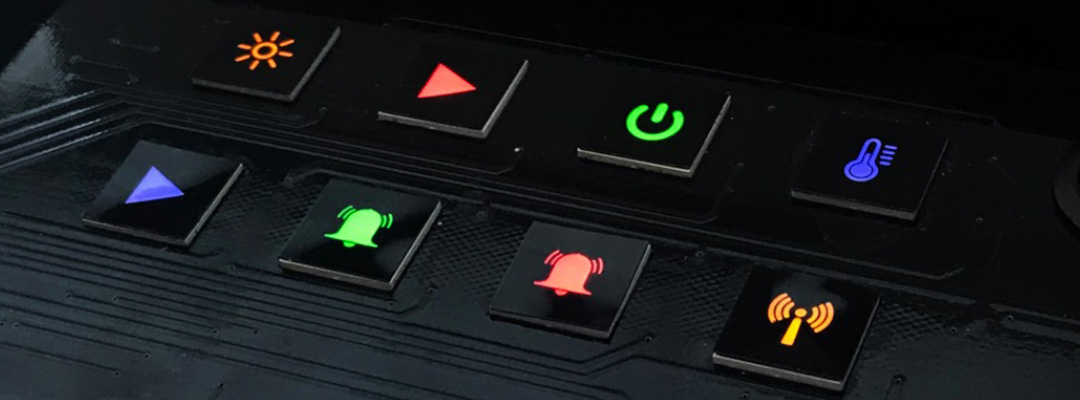
Why Do Physical Buttons Still Matter in a Touch-Screen World?
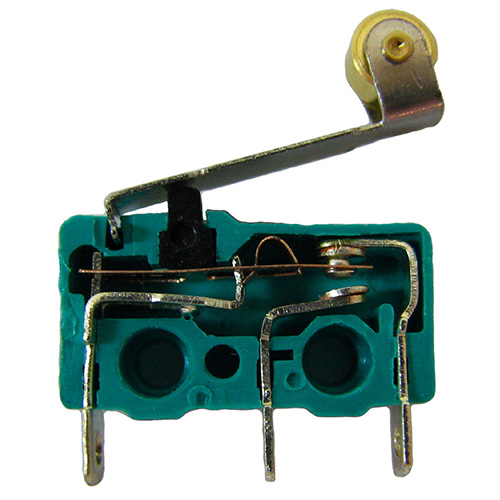
Physical buttons still matter because they give users instant, one-touch access to a specific function, and that kind of direct control has always been central to how people use electronics. It’s not unreasonable to say that our modern world wouldn’t be possible without a way for humans to control the electronics that power everything from computers, to small gadgets, to the cars we drive. Until recently, interaction meant connecting a physical switch, whether this meant the humble microswitch invented in the 1930s, or a more complex array like those found in computer keyboards.
Much of this operator input has migrated to touch-screen interfaces, especially on smartphones, but often a physical button is advantageous if users need to quickly access a certain area. Even with the trade-off of not being able to use that space for multiple inputs and data outputs, this type of interface can be much faster than scrolling through multiple menus just to press start or stop.
Why Are Icons Important on Buttons and Touch Screens?
Icons matter because they let users identify a function at a glance, whatever language they speak. They also fill a gap in the speed advantage that physical buttons offer. This increased speed of a physical button is evident when button locations have been memorized. For a new device, however, another advantage that touch screens have over buttons is the use of icons to indicate actions. Roughly 90% of the information processed by the human brain is visual, and our brains can process visual data 60,000 times faster than text. While this might seem trivial when deciding which button to press on a washing machine, in situations where time is critical, such as having to glance at a dashboard control on an automobile or even reading street signs, milliseconds matter.
The use of icons also means that there is no concern about displaying a word in different languages. As an ancient example, consider that Chinese characters can be read across multiple dialects and languages, skipping the idea of how a word is pronounced to directly convey meaning. On a much simpler level, the same could be said for a button that has a simple action drawing on it. A picture of a light bulb could indicate a button that lights up a room, while a series of axially arranged blades might indicate fan control. Both are easy to interpret regardless of the user’s native language. VCC’s industrial HMI design guide covers how symbols fit into a larger control panel. Icons solve the recognition problem, but the switch underneath still has mechanical limits.
How Do Capacitive Touch Sensors Compare to Traditional Buttons?
Capacitive touch sensors have no moving contacts, so they avoid the wear and contact bounce that can affect traditional buttons. Both problems trace back to the contacts themselves. Traditional buttons work by closing contacts to allow electricity to flow. While fine in many situations, this technology has been around in one form or another since the dawn of electrical appliances, and it involves the physical movement of internal and external parts that can eventually wear out. Beyond wear, physical switches have the potential to “bounce,” where contacts intermittently form a connection until it settles in its proper state. Contact bounce can normally be compensated for through software or hardware methods, but the extra complication presents a minor but real nuisance.
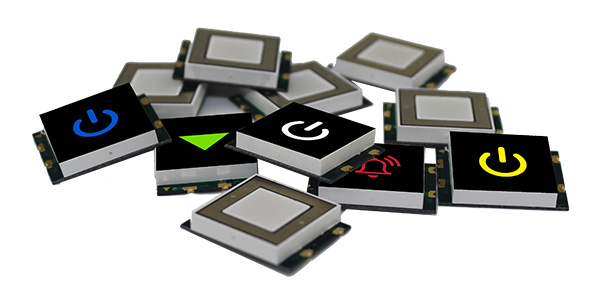
As an alternative to traditional contact-based switches, consider the CSM series illuminated, surface-mount, capacitive-touch sensor display by Visual Communications Company (VCC) for a future design. These components, which VCC says feature the smallest footprint in the industry for this type of sensor, measure 15 mm square and can be ordered in a variety of LED-illuminated colors for easy recognition. These capacitive touch buttons can also be imprinted with a library of standard icons, and custom images can be ordered as well. As solid-state devices, CSM series sensors have no mechanism to wear out and the need for software de-bouncing is a thing of the past.
How Do Capacitive Touch Sensors Prevent False Presses?
An additional benefit to this type of sensing technology is that since capacitive sensing only works with a conductive material like human fingers (even through clear glass or plastic), they will not respond to false presses from a variety of inanimate objects. So if a sensor is accidentally pressed by a broomstick, an airborne child’s toy or an errant robot, the device won’t typically respond. Something to consider in an unpredictable environment.
There is certainly a place for traditional buttons and there will be for some time. VCC capacitive touch sensors, however, present a practical alternative when physical contacts won’t do the job, and a full touch-screen interface is either overkill or inappropriate for the situation.
For more information on capacitive touch sensors and other products, browse VCC’s CSM series capacitive touch sensor displays.
Frequently Asked Questions (FAQs)
What Is a Capacitive Touch Sensor?
A capacitive touch sensor is a solid-state input device that detects a touch by sensing the change in capacitance a finger creates near its surface. Because nothing moves or closes, the sensor has no contacts to wear out or bounce.
What Are the Advantages of Capacitive Touch Sensors Over Physical Buttons?
Capacitive touch sensors have no moving parts to wear out, don’t need software de-bouncing and ignore false presses from most inanimate objects. Illuminated versions such as VCC’s CSM series also pair each button with an LED color and an icon, so users can identify functions at a glance.
Can Capacitive Touch Sensors Work Through Glass or Plastic?
Yes. Capacitive sensing works through clear glass or plastic, so designers can mount the sensor behind a protective panel.
Can VCC Customize the Icons on its Capacitive Touch Display?
Yes. VCC can imprint CSM series sensors with icons from its library of standard icons, and customers can also order custom images. The sensors come in a variety of LED-illuminated colors.