Back to Articles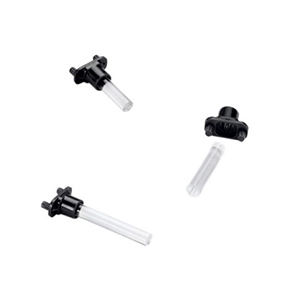

Interfaces in industrial equipment have evolved far beyond the simple on/off switch, but there is still significant potential to explore in providing safer, more productive user experiences.
Investing thought into industrial HMI design yields clear, measurable benefits:
● Improved worker safety
● Enhanced overall usability
● Decreased operator training time
● Increased machine uptime
● Greater daily productivity
● Reduced opportunity for operator error
From food processing and heavy manufacturing to transportation and medical devices, industrial verticals are moving quickly to address new user interface needs. The good news is that you do not need the latest touchscreen or wearable HMI to reap these rewards. Thoughtfully designed physical interfaces and visual indicator components deliver significant operational improvements.
How Do Color Schemes Improve Industrial HMI Usability?
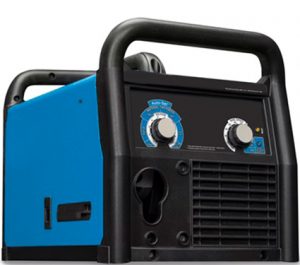
Color schemes enhance HMI usability by leveraging universal visual cues—like traditional traffic light colors (red, green, and yellow)—to help operators interpret equipment status instantly and reduce operational errors. Beyond these standard cues, adding specialized color indicators can communicate specific machine behaviors in the blink of an eye.
For example, MIG welders used in manufacturing and metal fabrication employ dedicated colored LEDs to convey critical operational data:
● Blue LED: Indicates the auto-set function is enabled for faster, safer setup.● Yellow LED: Warns that the machine is approaching maximum operating temperature.
Why Use a Standardized Color Scheme for HMI Design?
Implementing a standardized HMI color scheme establishes an intuitive visual framework across equipment, eliminating operator guesswork and accelerating reaction times during critical operational shifts. By maintaining a universal vocabulary across status indicators, engineers can design interfaces that immediately alert operators to normal conditions, warnings, or emergency stops.
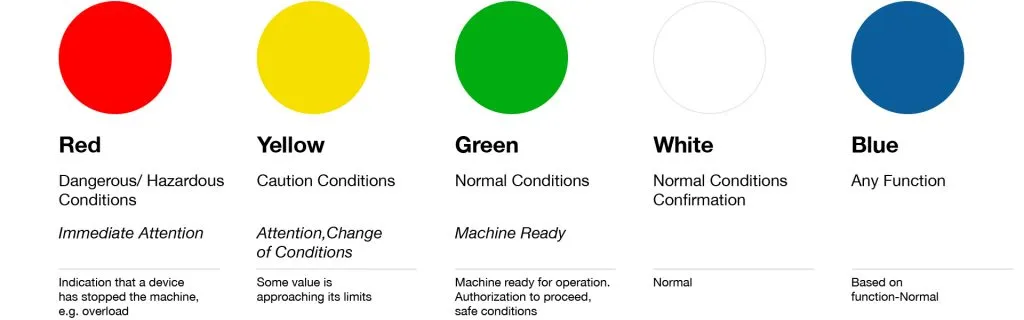
As shown in VCC’s Standardized Color Chart below, each LED color serves a distinct operational purpose:
● Red (Dangerous / Hazardous Conditions): Requires immediate operator attention. Signals critical events such as a device overload or automatic machine shutdown.
● Yellow (Caution Conditions): Indicates a change in conditions, alerting operators that a specific value is approaching its safe operational limits.
● Green (Normal Conditions): Confirms the machine is authorized to proceed, fully operational, and running under safe conditions.
● White (Normal Conditions Confirmation): Provides clear visual confirmation of standard, routine system activity.
● Blue (Specified Function Status): Communicates custom operational states or specific function activations based on machine design needs.
VCC’s Standardized Color Chart
How Does Light Functionality Enhance HMI Operation?
Light functionality enhances HMI operation by using dynamic visual patterns—such as color changes, steady illumination, and flashing sequences—to communicate real-time machine states and draw immediate operator attention to critical updates.
Beyond static color selection, how indicator lights behave directly impacts operator response times and machine safety:
● Color-Changing Indicators: A single indicator transition (e.g., shifting from red to green) provides a clear, space-saving visual signal that a machine has completed warm-up and is ready for safe operation.
● Flashing & Blinking Patterns: Pulsing or flashing lights actively draw the eye to flag urgent maintenance issues, system faults, or severe warning conditions.
● Steady Illumination: Continuous lighting reassures operators of ongoing, stable baseline operation without creating unnecessary visual fatigue.
How Does End-User Experience Shape Industrial HMI Design?
End-user experience shapes industrial HMI design because the quiet office where HMIs are developed is a far departure from real-world operating environments. To ensure an interface maximizes safety and efficiency, designers must interview end users and apply those learnings directly to the HMI layout. At the very least, the following physical and operational factors should be taken into consideration:
● Working Environment: Will the machinery be used inside a clean (or greasy) warehouse, or out in the field where it is exposed to the elements? It’s important to ensure enough contrast in the light that it can be seen during the brightest daylight hours without operators having to stop what they are doing and walk over to the machine or get close to it. For daytime and outdoor operation, using the appropriate illumination technology, such as LEDs with high mcd and maximum driving current along with a diffused lens to disperse the light on all sides, will increase output and enhance visibility.
● Operator Roles and Responsibilities: What is the typical job description and day-to-day work like for the operators?
● Other Machinery Commonly Used in This Role: Is there already a visual vocabulary (including a non-official one) that should be considered?
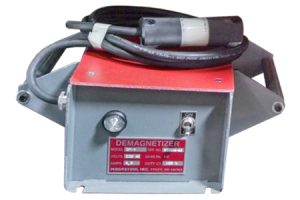
● Viewing Positions Used During Operation: Will operators be standing on a ladder or scaffolding? Will they be lying on the ground? Viewing angle is a key consideration to ensure operators can see what is happening with their machine without having to constantly climb up, down, bend, or otherwise create unnecessary safety risks. One example of optimized viewing angles is this demagnetizer control panel used in heavy-duty machinery. In addition to being operated in harsh environments for extended periods of time, demagnetizers need to provide constant communication of operational status. By using a dome-shaped lens with a 180-degree viewing angle, this demagnetizer control panel informs end users of the machine’s status for enhanced operation and decision-making.
Complying with Industrial HMI Safety Standards
Safe machine operation is job No. 1. Industrial HMI design must prioritize operator protection by adhering to all relevant standards—including those set forth by Underwriters Laboratories (UL), the Americans with Disabilities Act (ADA), as well as international and industry-specific regulations—no matter the device type or interface methodology used.
Which Illuminated Components Best Support Your HMI?
Selecting the right illuminated components depends on your specific layout and environmental requirements, with light pipes, panel mount indicators, and capacitive touch sensor displays serving as the core building blocks. Determining the right component combination optimizes visual communication and overall system usability:
● Light Pipes: Transmit light from surface-mount or through-hole LEDs directly to the display surface. Available in rigid, flexible, moisture-sealed, and right-angle configurations to suit various enclosure constraints.
● Panel Mount Indicators: Provide direct, high-visibility communication on the machine panel, available in a wide range of lamp types, sizes, and mounting styles.
● Capacitive Touch Sensor Displays: Combine interactive graphic control with color identification to simplify operation, often eliminating traditional mechanical switches to lower overall system costs.
A well-designed human-machine interface enhances usability, safety, and productivity. It all starts with understanding the needs of the end user.
To learn more about increasing safety and productivity through custom industrial HMI design, contact the VCC team today.
Frequently Asked Questions (FAQs)
Why Is Color Choice So Important in Industrial HMI Design?
Color choices establish an intuitive visual vocabulary using familiar traffic light conventions (red, green, yellow) alongside custom status colors. This enables operators to interpret equipment conditions instantly, reducing response times and minimizing operational errors.
How Does Environmental Lighting Affect Industrial Indicator Selection?
Operating in high-glare outdoor sunlight or bright indoor spaces requires high-contrast illumination. Using high-output LEDs (high millicandela rating), maximum driving current, and diffused lenses ensures indicator visibility from a distance without forcing operators to leave their positions.
What Are the Main Component Types Used for Visual HMI Illumination?
The primary visual components include panel mount indicators for direct status communication, rigid or flexible light pipes to channel light from board-level LEDs to the display surface, and capacitive touch sensor displays that combine interactive control with color identification.