Back to Articles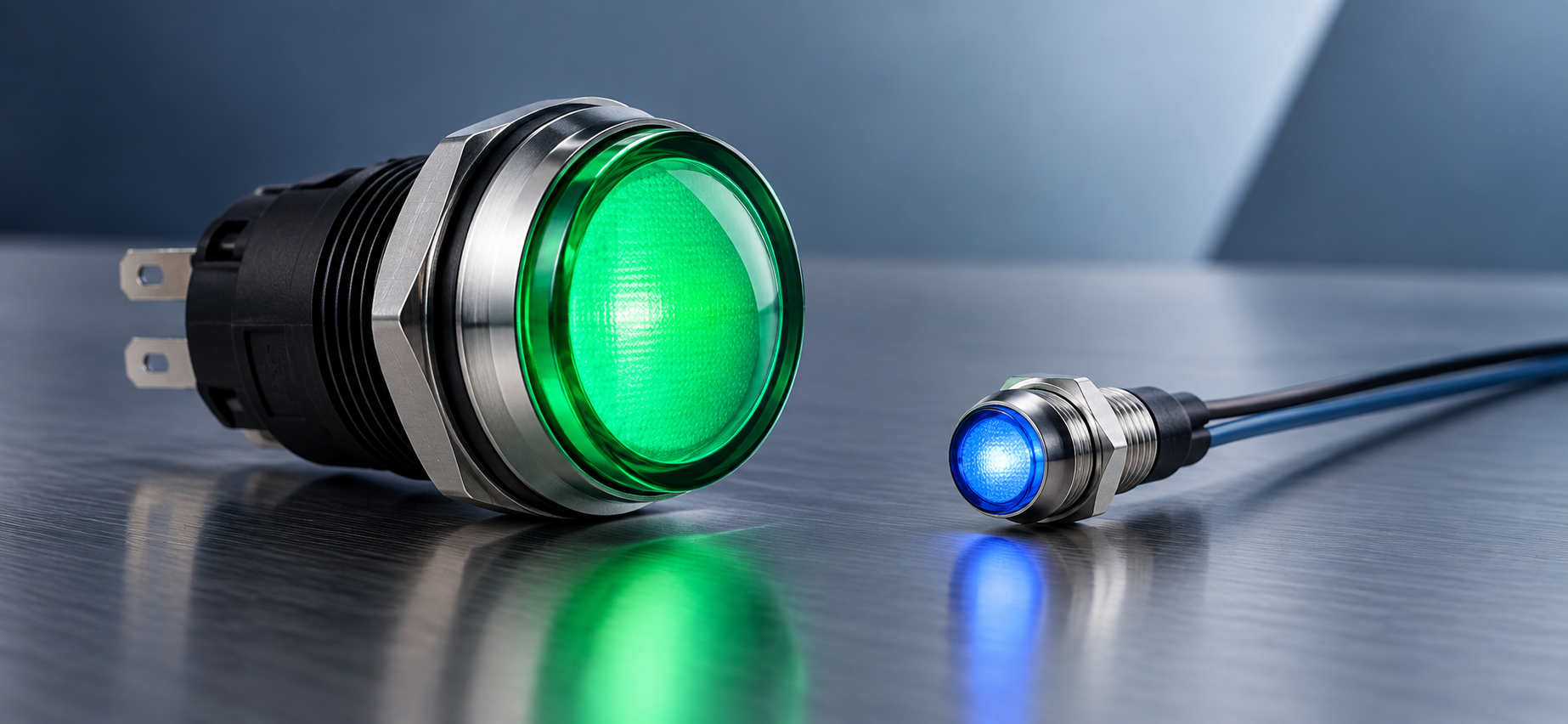
Write "indicator light" on a bill of materials and two different parts can show up. One is a 22 mm sealed lamp block rated for 120 VAC that a panel shop lands on spade terminals. The other is an 8 mm snap-in LED on flying leads running off a 12 VDC rail. Both report machine state to whoever is looking at the panel, and ordering the wrong family costs a punched cutout, a redesigned faceplate, or a build cycle spent waiting on replacements. What separates pilot lights from panel mount indicators is the panel each one was designed to live in.
What Is the Difference Between a Pilot Light and a Panel Indicator?
A pilot light is a panel indicator built to industrial control panel conventions: a 22 mm or 30 mm mounting hole, line or control voltage, a sealed front face, and screw or spade terminals sized for field wiring. Panel mount indicator is the wider category, covering devices from roughly 5 mm up to 16 mm that run on low-voltage DC, terminate in wire leads, quick-connect tabs, or PCB pins, and mount into equipment faceplates instead of enclosure doors.
Catalog language blurs that line because both families answer to several names. Suppliers list the same part as a pilot lamp, an indicator light, a status light, or a signal lamp depending on the market they sell into. The useful test is the panel behind the part, not the word on the page. An operator-facing enclosure door wired to UL 508A calls for one set of hardware, and an instrument faceplate with a populated board two inches behind it calls for another.
What Do Pilot Lights Do in an Industrial Control Panel?
Pilot lights report circuit and machine state to an operator standing at the enclosure: control power on, motor running, fault latched, guard open. Panel builders mount them in the same 22.5 mm or 30.5 mm holes their pushbuttons and selector switches use, so one punch size serves the whole operator interface and a start button can sit directly below the lamp that confirms it worked.Two construction decisions separate one pilot light from another. The first is the light source, where LED units dominate new panels and incandescent and neon lamps still ship into legacy equipment that already carries a maintenance stock of bulbs. The second is whether anyone can relamp the device. Relampable designs hold a replaceable lamp inside the lens and body assembly, and sealed LED units trade that serviceability for a longer service interval and a better seal at the panel face.Voltage handling follows the same two-track pattern. Full-voltage types connect straight to 120 VAC or 240 VAC control power, and transformer or resistor types drop the supply internally so a low-voltage lamp can sit on a line-voltage rung. IEC 60947-5-1 covers indicating devices in control circuits alongside the switches they sit next to, which is why a machine-panel pilot light carries terminal ratings and clearance specifications that a board-level indicator has no reason to publish.
What Do Panel Mount Indicators Do That Pilot Lights Cannot?
Panel mount indicators fit where a 22 mm hole will not go and run from the voltages a board already has. Bezel sizes step from about 5 mm through 6.35 mm (1/4 inch), 8 mm, 12 mm, and 16 mm, which lets a designer put eight status points on a faceplate that would hold two pilot lights.
Termination reflects that equipment-level use. Many indicators come on flying leads or 2.8 mm quick-connect tabs, and PCB versions solder straight into the board behind the panel. Current limiting is the specification designers get wrong most: a bare LED indicator needs an external resistor sized to its forward current, and integrated-resistor versions accept 5, 12, 24, or 28 volts directly and save a part on the board. VCC’s panel mount indicator range covers both approaches in single-color, bi-color, and RGB configurations.
Lens geometry is the third variable a designer controls. A domed or prominent lens throws light toward an operator standing off-axis, a flush lens keeps the faceplate clean and survives a knock from a passing cart, and a faceted lens spreads output to widen the viewing angle in a rack nobody reads straight on.
How Do Pilot Lights and Panel Indicators Compare Side by Side?
Six specification lines account for most of the distance between the two families
| Dimension | Pilot Light | Panel Mount Indicator |
|---|---|---|
| Panel cutout | 22.5 mm (IEC) or 30.5 mm (NEMA) | Roughly 5 mm to 16 mm |
| Supply voltage | 120/240 VAC line power or 24 VDC control power | 2 V to 28 V DC, with or without an integrated resistor |
| Termination | Screw or spade terminals for field wiring | Wire leads, quick-connect tabs, or PCB pins |
| Sealing | IP65 to IP69K front faces, NEMA 4X types available | IP40 to IP67, set by bezel and gasket design |
| Service | Relampable blocks or sealed LED units | Replaced as a whole part |
| Where it lives | Enclosure doors, machine consoles, motor control centers | Instrument faceplates, telecom chassis, medical and lab equipment |
The termination and sealing rows settle most specifications on their own. A panel shop landing 14 AWG on a door-mounted lamp needs a terminal it can torque a ferrule into, and an indicator with 26 AWG flying leads gives it nothing to work with. Washdown and outdoor installations push the same direction, since a face rated IP69K has to survive high-pressure cleaning that an equipment-grade bezel was never sealed against..
How Do You Match an Indicator to Its Electrical and Environmental Spec?
Three numbers narrow the field before any visual decision: supply voltage and current, the ingress rating needed at the panel face, and the temperature range the enclosure actually reaches. Certification marks then decide whether the part can go into the build at all.
Current draw is where board-level designs go wrong first. Indicator LEDs commonly run between 2 mA and 20 mA, and the figure a designer picks sets both apparent brightness and the resistor’s power dissipation. AC-rated indicators handle rectification internally, so dropping a DC part onto an AC rail behind a series resistor gives up half the cycle and produces visible flicker at line frequency.
Environment decides the rest. IEC 60529 defines the IP ratings, where IP65 covers dust ingress and low-pressure water jets and IP69K covers high-pressure, high-temperature washdown. That rating applies at the panel face, so the gasket, the panel thickness, and the mounting nut torque all have to match the drawing for the number to mean anything in the field. LED indicator temperature ranges commonly span -40 °C to +85 °C, which covers most industrial enclosures and not the inside of an unventilated cabinet sitting in direct sun.
Certification closes the process. A UL Recognized component carries conditions of acceptability the panel builder has to honor, and a UL Listed device stands on its own at inspection. Panel shops building to UL 508A care about that distinction, and export builds add CE marking plus CSA or IEC equivalents to the same checklist.

What Should Color and Lens Choice Tell the Operator?
Color carries assigned meaning in machine panels, and IEC 60073 with EN 60204-1 set the assignments: red for emergency or danger, amber or yellow for an abnormal condition, green for a normal or ready state, blue for a condition needing operator action, and white for information with no specific meaning attached. Departing from those assignments on a machine sold into Europe creates a compliance problem and, more immediately, an operator who misreads the panel under pressure. Our status light color guide works through the assignments in more detail.
Readability decides whether the color lands. Ambient light beats a dim indicator, so a lamp on an outdoor skid needs far more output than one on a benchtop instrument, and a tinted lens over a white LED washes out differently from a color LED behind a clear lens when sunlight hits the face at an angle.
Multi-color parts cut hole count where faceplate area is short. A bi-color or RGB indicator reports three or four states from one cutout under firmware control instead of separate lamps, and pulse-width modulation holds that color steady at whatever brightness a designer dims it to. Flashing adds another distinguishable state without another part, and control panel convention reads a slow flash as a pending condition and a fast flash as something needing attention now.
The cutout and the depth behind it eliminate more candidates than the light source does. Threaded bushing mounts take a nut on the back side and suit thicker panels and higher-vibration installations, and snap-in bezels install without tools into a specified panel thickness range and work loose outside it.
PCB-mounted indicators change the problem entirely. The LED sits on the board, so board position sets where the light comes out, and tolerance stack-up between board, standoffs, and faceplate decides whether the indicator sits flush. Light pipes resolve that mismatch by carrying light from a board-mounted LED to a defined point on the panel face, which frees the layout engineer to place the LED where the circuit wants it. Behind-panel depth and hole spacing matter just as much on a crowded HMI, where the body of a 16 mm bezel can collide with the connector behind it.
Specify a pilot light when the device mounts to an industrial enclosure door, gets operated by someone wearing gloves, shares a panel with 22 mm pushbuttons, and gets wired by a panel shop working to UL 508A. Specify a panel mount indicator when the light sits on an equipment faceplate, draws from a logic-level supply, and competes with connectors and displays for faceplate area.
Mixed cases usually come down to who does the wiring and what the spares kit looks like. A benchtop analyzer cleaned with a hose may take an IP67 panel indicator because the faceplate has no room for a 22 mm hole. A skid-mounted machine with a small local control station may go the other way and take pilot lights, for the sake of one punch size and one lamp stock plant-wide.
What Firmware-Driven Indicators Change About Panel Design
Status hardware is moving from one lamp per state toward one addressable indicator whose meaning lives in firmware. RGB parts driven by PWM let a design team change what amber signals in a software release instead of a hardware revision, and IIoT-connected panels push the same state to a dashboard an operator reads from a phone. Engineers working on custom HMI designs are building that flexibility in from the first schematic.
The hardwired lamp keeps its job anyway. A pilot light wired straight off a contactor coil reports what that coil is doing with no controller, no network, and no firmware version in the path, which is the same reasoning that keeps emergency stop circuits hardwired. Engineers specifying operator interfaces now design two layers at once: a configurable indicator set that carries detail and diagnostics, and a short list of directly wired lamps that still say something true after the rest of the panel goes dark.